User Authentication
In order to add QbProtect to a VMS or/and obtain the RTSP video stream from the device the user has to provide the credentials of an ONVIF key: an application key with the ONVIF / RTSP access option enabled.
|
An ONVIF key can be generated by enabling the ONVIF / RTSP access option from the user account page, as shown in the figure below. Please refer to QbProtect documentation in order to learn more about user management and application keys.
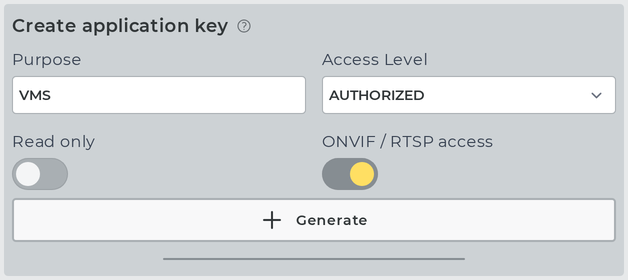
The resulting ONVIF key (password) in combination with the account user name (login) can be used, when prompted, as credentials pair (login/password) in the VMS or video player (e.g. VLC).

|
Access levels
What a VMS may do over ONVIF follows the ONVIF default access policy, applied to the access level and the read-only option of the ONVIF key it uses:
| ONVIF key | Allowed over ONVIF |
|---|---|
|
Reading the device information and the network, time, discovery, media and imaging configuration, subscribing to events and streaming video. |
|
In addition, changing the media configuration. |
|
In addition, changing the network, time and discovery configuration, rebooting the device, restoring the factory defaults (hard reset only), and listing and managing the ONVIF users. |
An ONVIF key with ADMIN access level can be created from an account with ADMIN access level.
ONVIF users
A VMS with a writable ADMIN ONVIF key can manage users itself, with the ONVIF user handling commands (GetUsers, CreateUsers, SetUser, DeleteUsers). It sees and manages the ONVIF users of every account, and lists the ONVIF key of each account as a fixed user. An ONVIF user is an additional ONVIF key with its own user name, created on the account of the ONVIF key that created it. The ONVIF user levels correspond to the access levels as follows:
| ONVIF user level | ONVIF key |
|---|---|
|
|
|
|
|
|

|